


|
|
Manual Setup |
Digital Setup |
|
Accuracy |
Limited by hand precision |
Sub-millimeter, screen-measured |
|
Reversibility |
Difficult, often means starting over |
Instant, tooth-by-tooth undo |
|
Storage |
Physical models, shelf space |
Cloud or local file, STL-based |
|
Time per revision |
Hours |
Minutes |
|
Sharing with patient or lab |
Photos of the physical model |
Interactive 3D view, exportable file |
Tech and Innovations
August 28, 2026
Digital Orthodontic Treatment Planning Software: 2026 Guide
A step-by-step guide to digital orthodontic treatment planning—from 3D setup and tooth segmentation to AI-assisted staging and aligner production. Learn how digital planning works in 2026 and who stays in control at every step.

SoftSmile Team
Editorial Team

Digital orthodontic treatment planning software turns a patient's scan into a step-by-step plan for every tooth movement, before a single aligner exists. Practices that adopt digital orthodontic treatment planning software replace plaster models and wax setups with a 3D model the doctor can review, adjust, and approve on screen. This guide walks through how that process works in 2026, for clinicians, clinic owners, and labs building or refining a digital workflow.
Below, we break the process into six stages:
● Diagnosis and data collection
● Building the 3D model and segmentation
● Simulating tooth movement and staging
● Adding attachments, IPR, and auxiliaries
● Clinician review and approval
● Turning the plan into aligners
What Is Digital Orthodontic Treatment Planning?
A digital setup is a 3D simulation of every tooth movement, from the patient's starting position to the agreed final result. The idea is not new. Harold Kesling described the setup concept in the 1950s, using wax and plaster models cut apart and repositioned by hand. Align Technology's ClinCheck made the digital version standard practice in orthodontics in the 2000s, and most orthodontic treatment planning software built since has followed the same basic logic: scan, segment, move, stage, review.
Planning is a distinct step from diagnosis. Diagnosis identifies the malocclusion, the skeletal relationship, and the clinical goals. Planning turns those goals into a clinical plan, tooth by tooth, movement by movement, that can be checked, revised, and reproduced. A well-built plan is a working document, not a prediction of the final result. It shows the doctor what the movements look like on screen, at each stage, so the doctor can decide whether that sequence is right for that specific patient.
This distinction matters because 3D orthodontic planning software can only simulate what it is told. Bone density, root shape, periodontal health, and soft tissue response are biological, not digital. A digital setup can show a rotation, a translation, or an extrusion in isolation. It cannot show how that patient's bone will actually remodel around it. The plan is a starting hypothesis, built on measurable data. The doctor's review is what turns that hypothesis into a therapeutic decision.
"A digital plan is only as good as the review it gets. I've seen staging that looked clean on screen and needed real changes once I checked root parallelism and the patient's periodontal chart. The software accelerates our workflow to reach that critical review phase, it does not replace the doctor's judgment."

Practices that move from manual to digital setups usually cite three concrete reasons, not a general preference for screens over models. First, revision speed: a change that took a lab technician an afternoon with wax now takes minutes on screen, which shortens the loop between the doctor's request and a plan ready for review. Second, storage and retrieval: a case file can be pulled up years later without a shelf of plaster models to search through. Third, measurement: on-screen tools report distances and angles directly, instead of relying on a technician's read of a physical model.
Digital vs Manual (Traditional) Setup
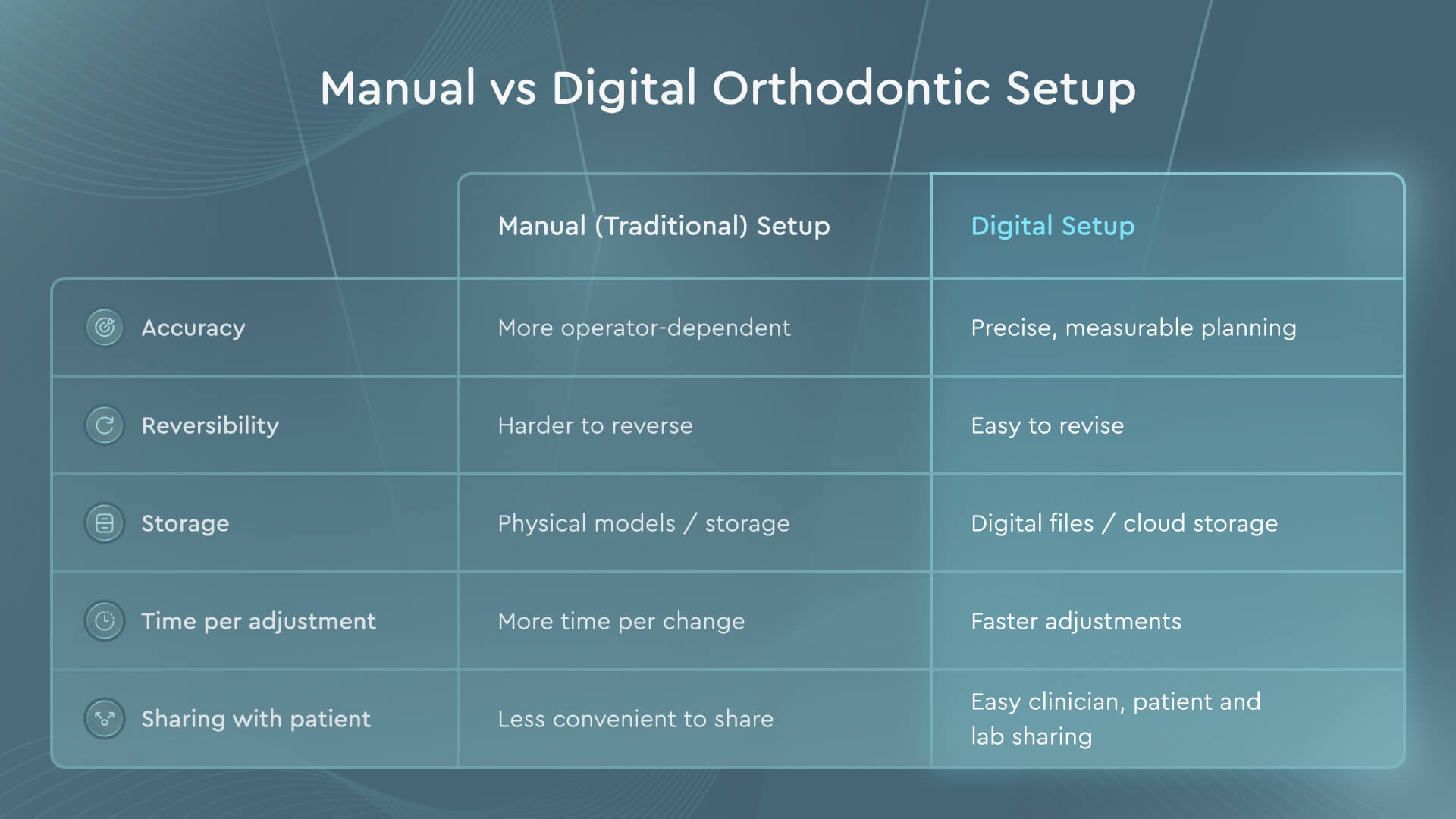
Manual setups used plaster models, sectioned by hand, then held in place with wax while the technician moved individual teeth toward a target position. Every revision meant remaking part of the model. Digital setups use a 3D virtual model that can be segmented, moved, and restaged without remaking anything physical, and the result can be viewed from any angle before it is approved.
Orthodontic Diagnosis and Data Collection: Where Planning Starts
Every plan starts with data. The standard inputs are an intraoral scan or digital impression, a set of clinical photographs, and, for many cases, a CBCT scan. Intraoral scanners export the arch as an STL file; CBCT data comes in DICOM format, and the two are aligned to build a combined model that shows both the crown surface and the root and bone beneath it. Digital radiographs round out the picture where root position, airway, or impacted teeth matter for the plan.
Orthodontic diagnosis and treatment planning now happens largely inside one file set instead of a folder of separate paper and film records. CBCT integration lets the doctor see root angulation and bone thickness alongside the surface scan, which is particularly relevant for cases involving impacted canines, planned extractions, or borderline surgical decisions. Digital impressions also remove a source of error that plaster models carried for decades: distortion during pouring and storage.
Data quality is not a side issue here; it connects directly to oral health and orthodontic planning outcomes further down the line. A scan with poor margins, missing interproximal contact, or motion artifact on the CBCT does not stay contained to that one file. It carries forward into segmentation, into staging, and eventually into a physical aligner that does not fit as planned. Practices that get consistent results from digital workflow tend to invest time in scan protocol early, not just software selection.
Scan protocol varies by case type but usually follows the same order: full-arch intraoral scan of both jaws, bite registration in the patient's habitual occlusion, extraoral and intraoral photographs, and a CBCT if the case involves impacted teeth, planned surgery, or a borderline extraction decision. Labs and clinics that standardize this order see fewer rescans, which matters because a rescan delays the entire case, not just the diagnostic step.
Once the data is collected, verified, and confirmed to be complete, the case can move into building the 3D model.
Everything after this point builds on that model, stage by stage, with the doctor checking each stage before it moves forward to the next.
Steps in Orthodontic Treatment Planning (The Digital Workflow)
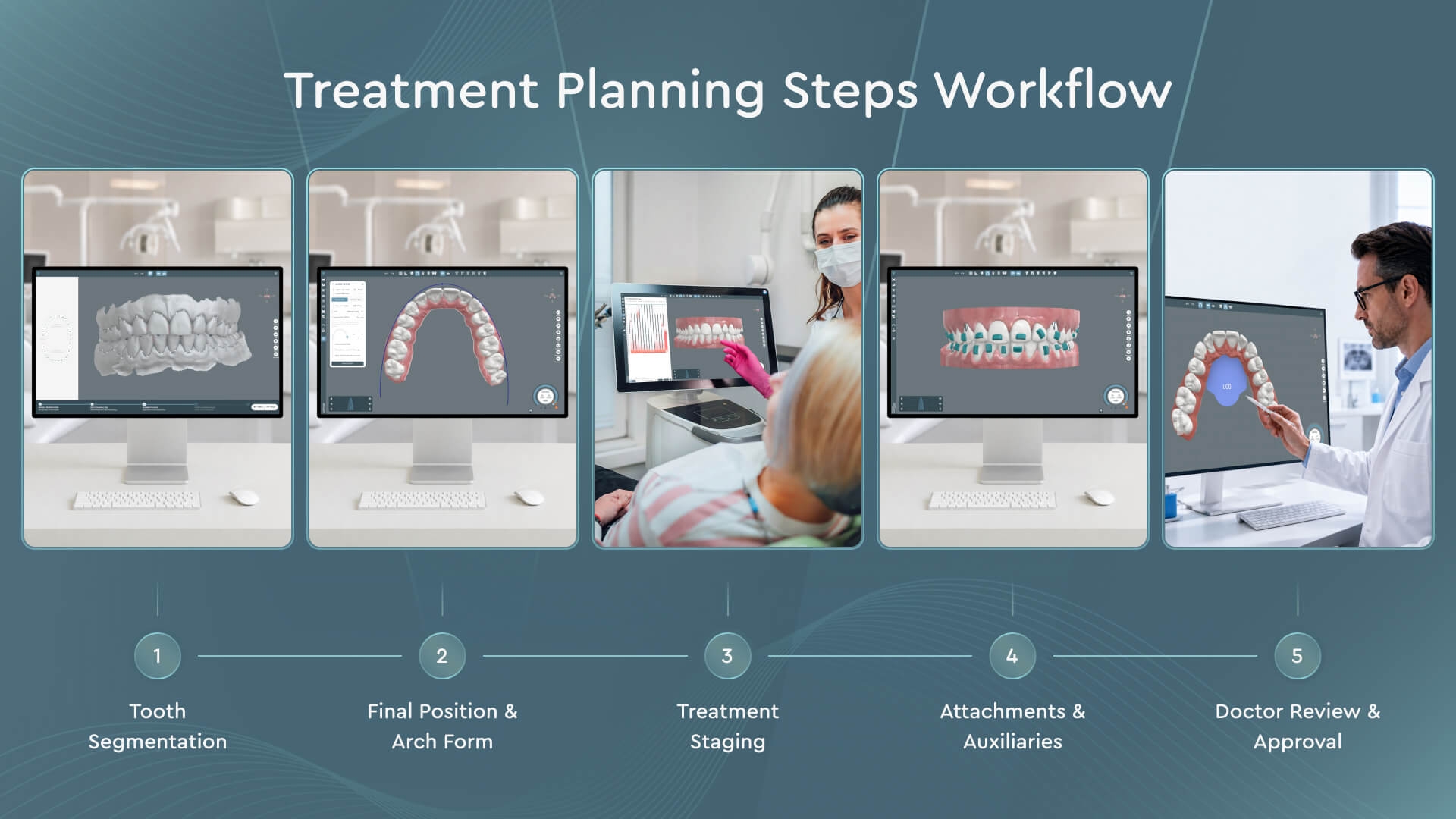
Step 1 — Tooth Segmentation
Segmentation separates each tooth from the gingiva and from its neighbors on the 3D model, so it can be moved independently in later steps. Most digital orthodontic treatment planning software does this with a mix of automation and manual correction: the software proposes tooth boundaries based on the scan geometry, and a technician or the doctor adjusts the margins where crowding, tight contact points, or restorations make the automatic read unreliable. Getting segmentation right at this stage matters more than it looks. An incorrect boundary on one tooth propagates into every movement calculated for that tooth afterward.
Step 2 — Setting the Final Position and Arch Form
Next comes the target: where each tooth should sit at the end of treatment. The software builds an arch form based on the patient's own anatomy rather than a generic template, and the doctor sets final tooth positions against that form, considering root parallelism, midline, overjet and overbite targets, and the occlusal scheme agreed during diagnosis. This is one of the steps where clinical experience shapes the outcome most directly; two doctors looking at the same starting scan can reasonably set different final positions based on different treatment philosophies.
Step 3 — Staging (Sequencing Tooth Movements)
Staging breaks the total movement, from starting position to final position, into a sequence of smaller steps. This is where 3D orthodontic planning turns into applied biomechanics: which teeth can move together without interfering with each other, how far each stage can safely move a tooth, and how the sequence supports root parallelism and controlled tipping rather than uncoordinated, tooth-by-tooth guesswork. Overcorrection is often built in at this stage for movements prone to relapse, such as rotations of round teeth like premolars.
Step 4 — Attachments, IPR, Elastics and Auxiliaries
Attachments, interproximal reduction (IPR), elastics, and bite ramps are added where the movement plan needs mechanical support that the aligner shape alone cannot provide. Attachments give the aligner a point to grip for rotation, extrusion, or bodily movement. IPR, sometimes called stripping, creates interproximal space without extraction, in amounts calculated against the total space needed for the case. Elastics manage bite correction between arches, and bite ramps help manage vertical movement of anterior teeth. Each of these is placed based on the specific movement it needs to support in that stage, not applied as a default across the case.
Step 5 — Clinician Review and Approval
The plan returns to the doctor for review before anything is manufactured. This is where every prior step gets checked against clinical judgment: does the staging sequence make sense given this patient's periodontal status and root morphology, is the orthodontist treatment plan consistent with the original diagnosis and the goals discussed with the patient, and does anything need to change before the case moves to production. In a properly built workflow, nothing proceeds to aligner manufacturing without explicit doctor approval, stage by stage if needed.
The Role of AI in Orthodontic Treatment Planning
AI in dentistry has moved from research papers into daily case work over the past several years, most visibly in segmentation and initial staging, where pattern recognition on large sets of scan data can complete a first pass faster than a technician working tooth by tooth. That first pass still needs review before it becomes a plan. AI in orthodontic treatment planning functions as a way to reduce the setup work that happens before a doctor looks at a case, not as a way to skip that look.

According to SoftSmile, cases built with AI-assisted segmentation and staging in VISION can cut planning time by up to 95% compared to a fully manual setup. That figure reflects SoftSmile's own case data and should be read as a company claim about its own platform, not as an industry-wide average.
The distinction that matters for clinicians is where automation stops and judgment starts. Segmentation and a first staging pass can be automated with reasonable reliability today. Whether that staging actually fits a specific patient, given their periodontal condition, compliance history, growth stage, or bite complexity, stays a clinical decision that the software does not make. The practical way to think about ai in orthodontic treatment planning is as a faster starting draft, not a finished plan: the software proposes; the doctor decides. Cases that skip that review step tend to surface problems later, during treatment, when they are more expensive to fix than they would have been on screen.
From Digital Plan to Clear Aligners
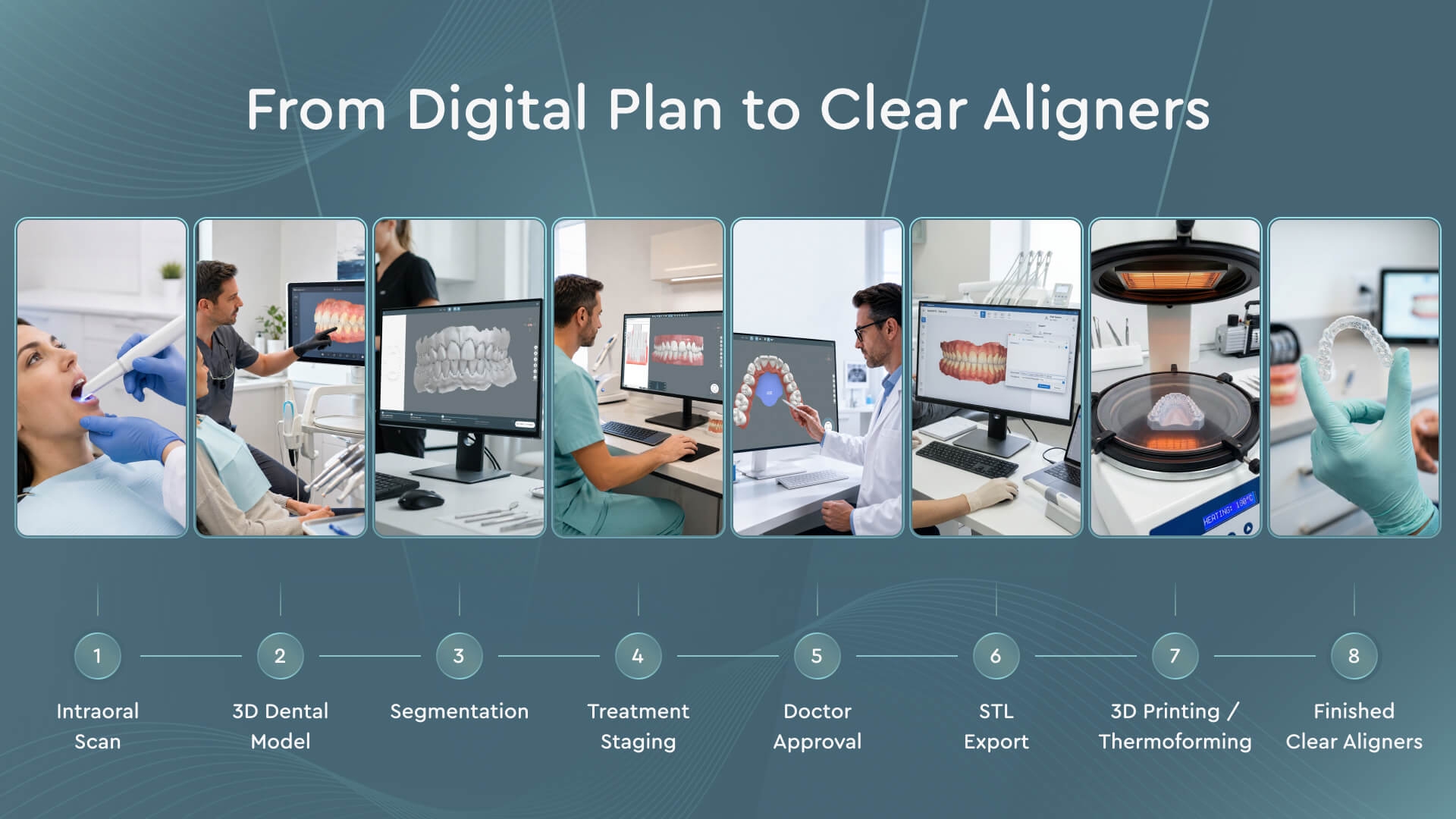
Once the doctor approves the plan, each stage becomes a physical aligner. The approved 3D model is exported, typically as a set of staged STL files, one per aligner in the sequence, and either 3D printed as a model for thermoforming or printed directly, depending on the manufacturing setup. Each tray corresponds to exactly one stage of the plan, so the aligner sequence is a direct, tooth-by-tooth translation of what the doctor approved on screen. Nothing is added or changed between the approved digital plan and the physical trays the patient wears.
Not every case finishes cleanly on the first sequence. Growth, compliance gaps, or a plan that needs adjustment mid-treatment sometimes call for a refinement: a new intraoral scan of the current position, a revised plan for the remaining movements only, and a new short set of trays. The refinement runs through the same workflow described above, diagnosis of the current state, staging, review, and export, just applied to where the patient actually is rather than the original starting point.
How to Choose Digital Orthodontic Treatment Planning Software
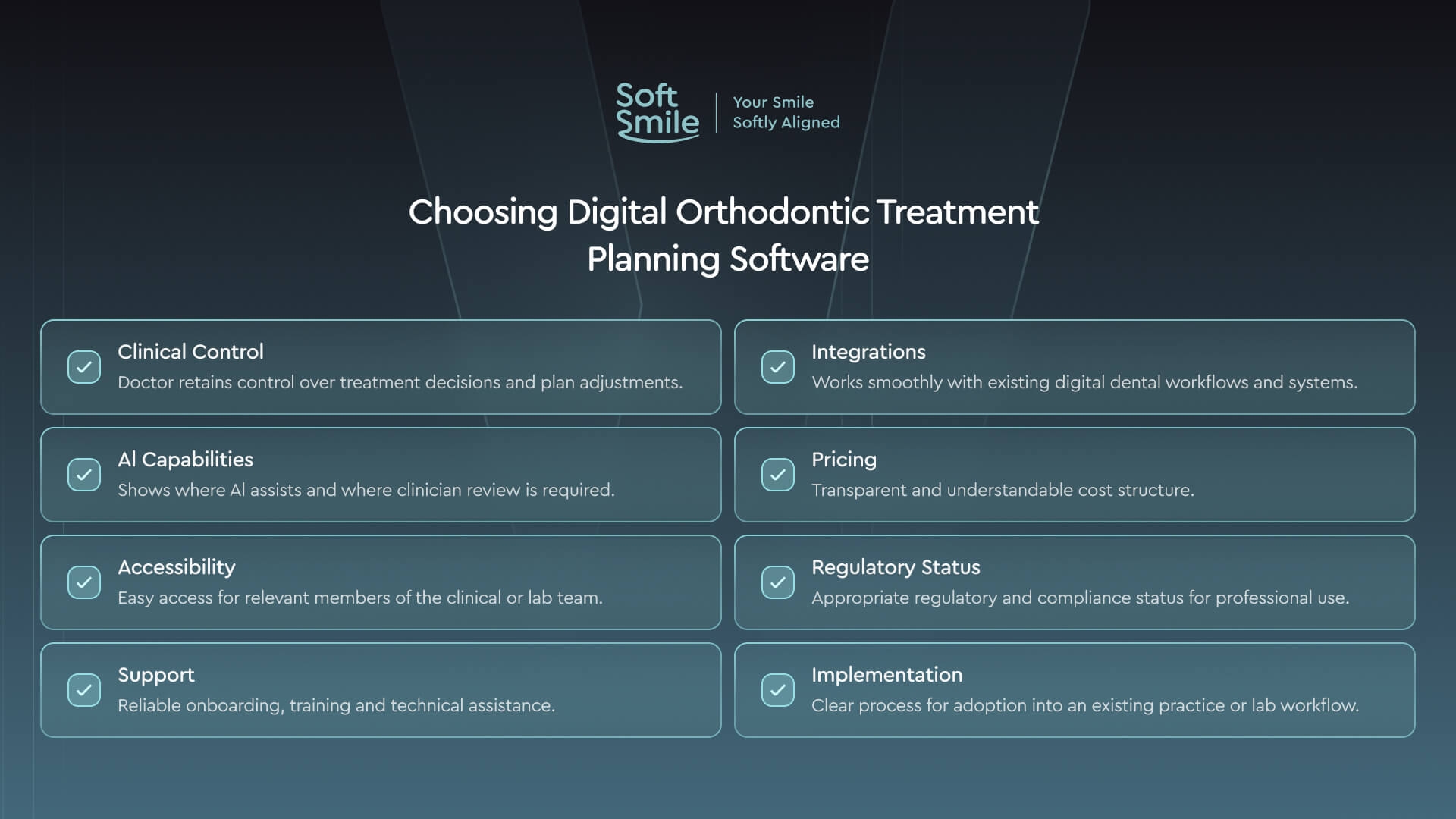
Software choice comes down to a short list of practical questions that matter more than feature lists.
● Clinical control. Can the doctor edit every stage individually, or only approve or reject a finished plan as a whole?
● Data integrations. Does the platform accept files from your existing scanner and CBCT unit without extra conversion steps?
● AI scope. What does automation actually handle, and what is explicitly left for the doctor to decide?
● Pricing model. Per case, subscription, or a mix, and what happens to unused capacity in a slower month?
● Access. Cloud-based and reachable from any device, or tied to a single workstation in the office?
● Regulatory status. Does the platform hold FDA clearance, or the equivalent, for the markets you practice in?
● Support and onboarding. Who trains the team on the workflow, and how quickly can a new case actually ship?
|
Criterion |
Why it matters |
|
Clinical control |
Determines how much of the plan the doctor can actually change, not just approve |
|
Integrations |
Avoids re-exporting or reformatting scan and CBCT data between systems |
|
AI scope |
Clarifies what is automated versus what stays doctor-reviewed |
|
Pricing |
Per-case pricing scales with caseload; a flat subscription does not adjust with volume |
|
Access |
Cloud access lets a clinical team review cases from any device, not one machine |
|
Regulatory status |
Confirms the software meets clearance requirements for the practice's market |
Practices moving from manual or outsourced setups tend to underestimate the onboarding question. A platform that is technically capable but takes weeks to learn will slow case turnaround before it speeds it up.
A useful test before committing: export one real case through the trial workflow, from scan to staged plan, and time it. That single case reveals more about fit, integration friction, and how much control the doctor actually keeps than any feature comparison sheet.
About SoftSmile — VISION for Doctor-Controlled Planning
VISION is SoftSmile's digital orthodontic treatment planning software. Every stage the software proposes, segmentation, arch form, staging, is editable by the doctor before a case moves further. Vision Concierge, the platform's AI assistant, prepares a first pass on segmentation and staging; it does not approve cases, and no case reaches production without a doctor's sign-off.
SoftSmile holds more than 130 patents, more than 20 of them covering biomechanical AI methods used in staging and movement prediction. VISION integrates with intraoral scanners, including Medit, and works directly from STL and CBCT data without manual reformatting. The platform has held FDA 510(k) clearance since 2022.
If you want to see the workflow described in this guide applied to one of your own cases, request a VISION demo and export a first plan to review.
FAQ
What is digital orthodontic treatment planning?
It is the process of simulating every tooth movement in a 3D model before treatment starts, so the doctor can review and approve the plan before any aligner is manufactured.
What are the steps in orthodontic treatment planning?
Data collection, building and segmenting the 3D model, setting final tooth positions and arch form, staging the movements, adding attachments and IPR where needed, and doctor review and approval.
How does AI help in orthodontic treatment planning, and who stays in control?
AI can automate tooth segmentation and produce a first staging pass. The doctor reviews and approves every plan, stage by stage if needed, before it moves to production.
What file formats and data are needed?
An intraoral scan or digital impression as an STL file, a set of clinical photographs, and, for many cases, a CBCT scan in DICOM format.
How does the plan turn into aligners?
Each staged position in the approved plan is exported and manufactured as one aligner, so the tray sequence matches the plan exactly, tooth by tooth.
Subscription vs pay-per-case: which pricing model is better?
It depends on caseload. High-volume practices often do better on a flat monthly rate; lower or variable case volume tends to fit per-case pricing more closely, since there is no unused monthly capacity to pay for.
Digital planning, doctor-approved
Digital orthodontic treatment planning software does two things well: it makes the plan visible before treatment starts, and it makes changing that plan fast when something needs to move. Neither replaces the doctor's judgment about whether the plan is right for the patient in front of them. That judgment is the part software does not automate, and the part a well-built platform is designed to support rather than skip.


Sign up for our newsletter!
Case Studies, Podcasts, Ebooks, Events, Webinars, Company news, and more...
By subscribing you agree to the Terms of Use and Privacy Policy.


